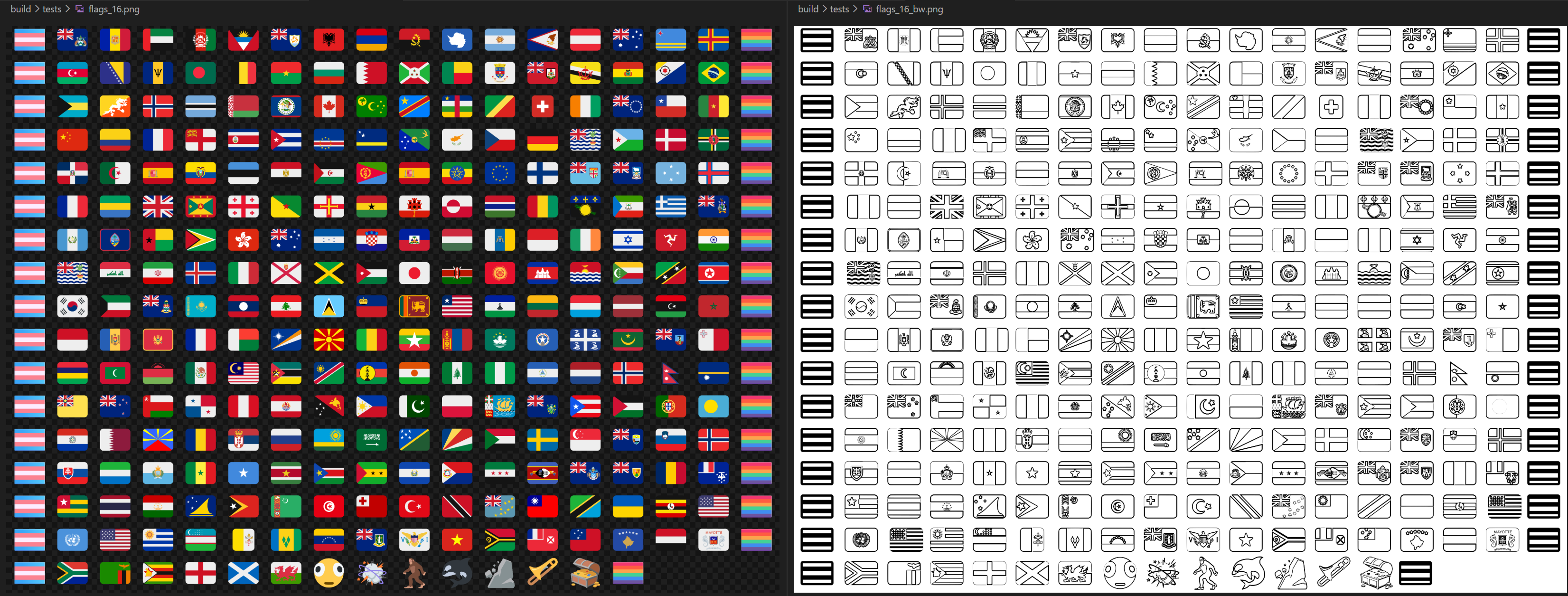
Almost two months ago now, I've reworked the entire flag emojis project. Kinda took a while to get to writing this post... The entire build process was remade with Make, and the entire font is now compiled from sources directly from twemoji's repo. Additionally, all the emojis are now properly sized (same width as Fluent 3D's emojis), the font now integrates perfectly with Windows 8 through 11, and also includes new 17.0 emojis that aren't yet in Fluent 3D!
I've also prepared a cool new installation method! Simply run this in PowerShell:
irm https://chsm.dev/get-flag-emojis | iex
Ideal for unattended installations and auto-updates! Let me know how well it works.
Glyph widths and COLRv0
Before I moved to Make, I thought I'd update the Twemoji font to the latest version. Before, I was just subsetting the old font, built by quarrel a year ago, v16.0.1. But Twemoji is now at v17.0.3! So, I changed the build steps to clone the jdecked/twemoji repo and compile the emojis' SVGs yourself using nanoemoji. While I was at it, I also fixed the glyphs' advance widths:
nanoemoji --color_format glyf_colr_0 --upem 2048 --width 2812 `
  --transform "scale(1.666666) translate(-554.666666, 85.333333)" `
  $(Get-Content flag-glyphs.txt)
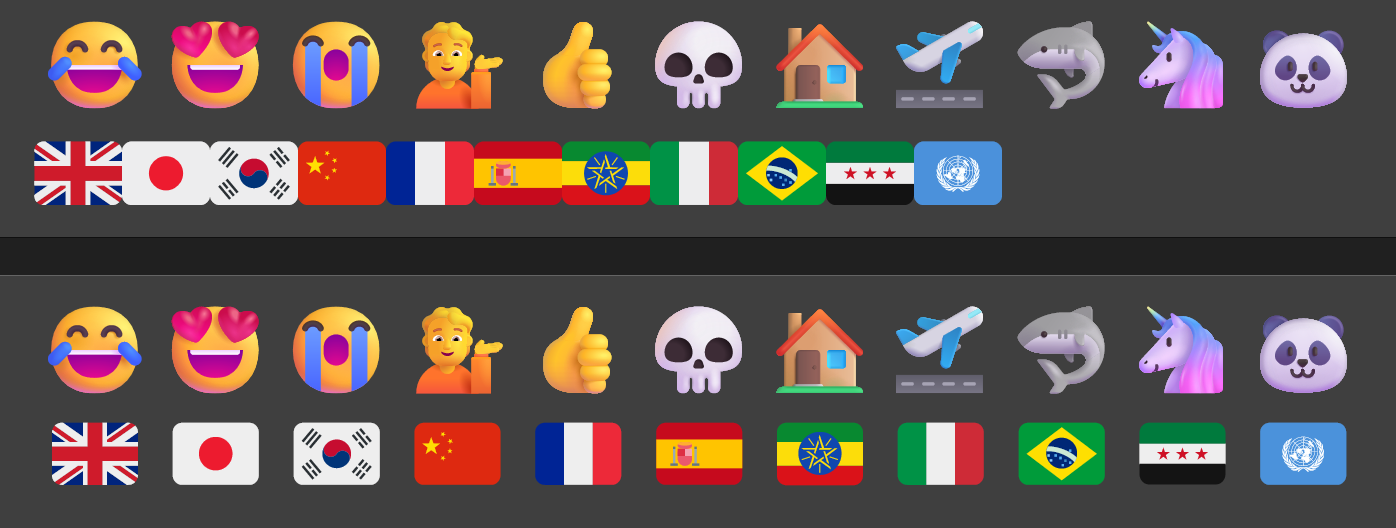
I've also found out that COLRv1 is an extension of COLRv0. So COLRv1-supporting apps can read both v1 and v0 tables. And apps that only support COLRv0 can still read a v1 table, provided that it contains v0 records, of course. I compiled the flag emojis as v0, and then merged them with Fluent 3D's v0 & v1. The merge script is a mess, so I won't show it here.
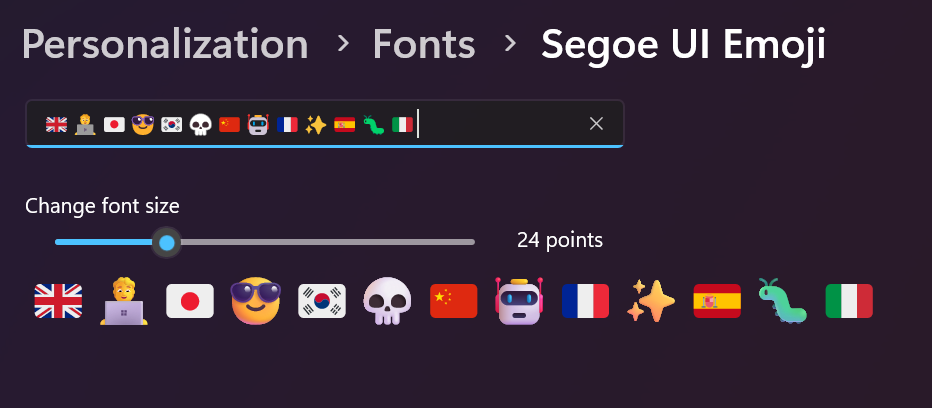
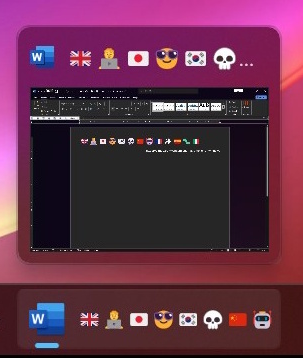
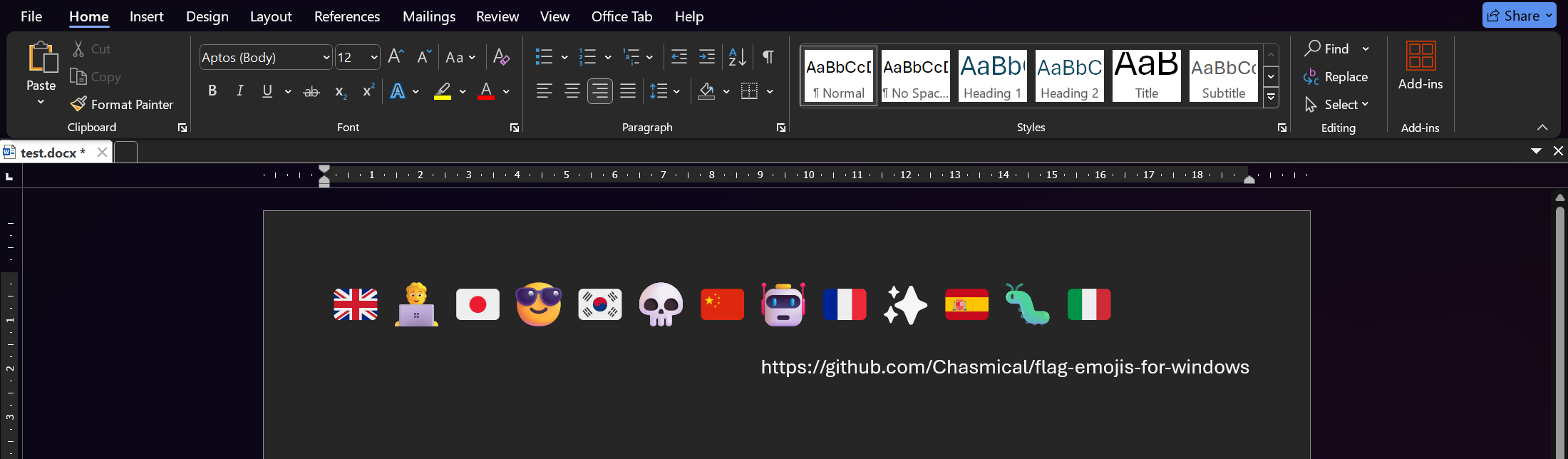
The downgrade to COLRv0 has fixed the rendering of flags in some places: in UWP input fields (e.g. most of system UI), the taskbar and also, pretty importantly, Microsoft Word.
Moving the build process to Make
After starting this project, I didn't think I'd have to re-build everything so often: changing a few files and then re-running a part of the build process manually step by step. I had to do quite a lot of experimenting and waiting for commands to finish, when adjusting the flag widths and building a COLRv0 font, so I decided to move to a more automated building approach.
I considered several more modern alternatives: Taskfile and Just, but upon my attempts to rewrite the build system in those, I found out that they're just glorified task runners with not as much support for change detection as I had hoped. Also, just look at how verbose Taskfile is, compared to Makefile! So, I was left with Make as the only good option.
 /flag-emojis-for-windows/Taskfile.yml
# So incredibly verbose! Some files are specified twice
find_flag_glyphs:
desc: Gets available flag glyphs from /assets/svg/*.svg
deps:
- update_twemoji_repo
sources:
- scripts/find_flag_glyphs.cs
- build/jdecked-twemoji/assets/svg/*.svg
generates:
- build/flag-glyphs.txt
cmds:
- dotnet scripts/find_flag_glyphs.cs >build/flag-glyphs.txt
 /flag-emojis-for-windows/Makefile
# Very succinct, with convenient auto-variables substitutions
build/flag-glyphs.txt: scripts/find_flag_glyphs.cs build/jdecked-twemoji/commit.sha
dotnet.exe $< >$@
I started with 13rac1/twemoji-color-font's Makefile as a template, since it already had all the things to build a color font from SVGs, along with black-and-white fallback glyphs.
At first, I installed Make on Windows, but realized it was a bad idea a few hours later: it used PowerShell, and all the build commands were way too long for my liking. Some commands just had to be too complicated, e.g. Create-Item always throws an error if the path already exists, so I had to write if (-not Test-Path build) { Create-Item build -ItemType Directory }. But most importantly, Windows doesn't update directories' LastModifiedTime, only the files', meaning I probably wouldn't be able to build a good change-detecting build system on it.
So, then I installed Make on a Ubuntu WSL, and everything was going nicely for a while. I was learning how WSL and Make worked, and how to write Bash scripts. Until I ran into this one weird limitation of Make... All the recipes' prerequisites are only determined once, meaning that a pattern like build/step1/%.svg is not gonna capture anything on first run. And then a pattern like build/step3/%.svg won't capture anything until after the third run, and so on. You'd need to call make build several times to get a proper font that's not built from 0 glyphs.
So I ended up abandoning Makefile's patterns %.svg and wrote my own change detection:
build/svg-color/.manifest: build/glyph-paths.txt
  # Create build/svg-color/ directory
  @mkdir -p $(@D)

  # For each file in build/glyph-paths.txt, compare it against build/svg-color/$glyph
  changed=$$(for glyph in $$(cat $<); do
    color=$(@D)/$${glyph##*/};
    [ "$$color" -nt "$$glyph" ] || echo "$$glyph";
  done);

  # If there are any newer source files, recompile SVGs in build/svg-color/
  if [ -n "$$changed" ]; then
    count=$$(echo "$$changed" | wc -l)
    echo "Copying $$count glyphs from twemoji/jdecked..."

    # Optimize SVGs with SVGO, using all available cores in batches of 20
    echo "$$changed" | xargs -n 20 -P "$(CPU_CORES)" $(SVGO) --quiet --multipass -o $(@D) -i

    # Update modified date of build/svg-color/.manifest
    touch $@
  fi
Adding more build steps
While writing the Makefile, I noticed that the repo cloning was taking a very long time in WSL. Turns out, WSL has to do quite a bit of work, emulating Unix's filesystem to forward the events to Windows' filesystem correctly. The solution was to use git.exe instead of git, which would run Windows' git instead of the one inside WSL.
# As I'm using a WSL to emulate Unix, some operations (particularly I/O intensive ones, like git)
# are better off-loaded back to Windows by using `git.exe` (from Windows' PATH) instead of `git`.
# `git.exe` is used instead of `git` automatically if: 1. it's on a WSL at all, and 2. the current
# directory is somewhere in /mnt/* (that's where Windows' partitions (e.g. C:, D:) are).

IS_WSL := $(shell [[ -n "$$WSL_DISTRO_NAME" && $$PWD == /mnt/* ]] && echo yes)

define find_exe
$(if $(IS_WSL),$(shell command -v $1.exe >/dev/null && echo $1.exe || echo $1),$1)
endef

GIT := $(call find_exe,git)
# ... other commands too
For the generation of black-and-white fallback glyphs I pretty much kept everything that 13rac1's Makefile had, I only made some WSL-, xargs- and font-specific adjustments.
# ...
    echo "$$changed" | xargs -n 1 -P "$(CPU_CORES)" sh -c '
      bw=$(@D)/$${1##*/};
      echo "Converting to B&W $${bw##*/}...";
# Prevents random errors when running multiple Inkscapes in parallel:
# https://gitlab.com/inkscape/inkscape/-/work_items/4716#note_1898150983
      export SELF_CALL=xxx;

      $(INKSCAPE) -w 1000 -h 1000 --export-filename "$$bw.png" "$$1";
      $(MAGICK) "$$bw.png" -gravity center -extent 1066x1066 "$$bw.bmp";
      $(MKBITMAP) -g -s 1 -f 10 -o "$$bw.pgm" "$$bw.bmp";
      $(POTRACE) --flat -s -W 36pt -H 36pt -o "$$bw" "$$bw.pgm";
# Note: SVGO can't meaningfully optimize Potrace's output. It removes metadata and transforms,
# and converts int coords to float coords, resulting in an average 50% size increase. But, we
# do need to change the width and height from 36pt to just 36, so it's sized correctly.
      sed -i '\''s/width="36.000000pt" height="36.000000pt" //g'\'' "$$bw";
      rm "$$bw.png" "$$bw.bmp" "$$bw.pgm";
    ' sh
# ...
Then I moved the rest of the building commands over to Make:
# When the svg-color/ manifest changes, rebuild the font with color flags
build/twemoji.flags.color/Font.ttf: build/svg-color/.manifest
	@$(NANOEMOJI) --color_format glyf_colr_0 --upem 2048 --width 2812 \
		--transform "scale(1.666666) translate(-554.666666, 85.333333)" \
		--build_dir build/twemoji.flags.color \
		$$(ls -1 build/svg-color/*.svg)

# When the svg-bw/ manifest changes, rebuild the font with b&w flags
build/twemoji.flags.bw/Font.ttf: build/svg-bw/.manifest
	@$(NANOEMOJI) --color_format glyf --upem 2048 --width 2812 \
		--transform "scale(1.95) translate(-554.666666, 21.333333)" \
		--build_dir build/twemoji.flags.bw \
		$$(ls -1 build/svg-bw/*.svg)

# Decompile the fonts to .ttx
build/seguiemj.ttx: build/seguiemj.ttf
	@rm -f $@ && $(FONTTOOLS) ttx $<
build/twemoji.flags.color/Font.ttx: build/twemoji.flags.color/Font.ttf
	@rm -f $@ && $(FONTTOOLS) ttx $<
build/twemoji.flags.bw/Font.ttx: build/twemoji.flags.bw/Font.ttf
	@rm -f $@ && $(FONTTOOLS) ttx $<

# Merge all the fonts into one
build/merged.ttx: scripts/gen_merged_font.cs build/seguiemj.ttx build/twemoji.flags.color/Font.ttx build/twemoji.flags.bw/Font.ttx
	@$(DOTNET) $^ $@
build/merged.ttf: build/merged.ttx
	@rm -f $@ && $(FONTTOOLS) ttx $<
Imagine how many building steps I'd have to repeat now, if I hadn't used Make!
New 17.0 emojis and tests
Then, I decided I would put Twemoji 17.0 emojis fallback into the main release stream (I had previously released one such version as a pre-release for issue #10), since the addition of 17.0 emojis is purely additive in nature (who would've thought).
 /flag-emojis-for-windows/scripts/find_flag_glyphs.cs
// Add new 17.0 emojis if a flag is specified
if (args.Length > 0 && args[0] == "--with-new-17.0") {
string[] codepoints = ["1faea", "1faef", "1fac8", "1facd", "1f6d8", "1fa8a", "1fa8e"];
foreach (string cp in codepoints) {
Console.Write($"build/jdecked-twemoji/assets/svg/{cp}.png\n");
}
}
Then I automated the rendering tests with HarfBuzz as well:
# Can be overriden with `make test FLAGS_PER_LINE=8`
FLAGS_PER_LINE ?= 16
test: build/tests/flags_$(FLAGS_PER_LINE).png build/tests/flags_$(FLAGS_PER_LINE)_bw.png
# Group flags into lines and render them using hb-view
build/tests/flags_$(FLAGS_PER_LINE).txt: scripts/print_glyphs.cs build/glyph-paths.txt
@mkdir -p $(@D)
@$(DOTNET) $^ | xargs -n $(FLAGS_PER_LINE) | tr -d " " | sed 's/^/🏳️⚧️/; s/$$/🏳️🌈/' >$@
build/tests/flags_$(FLAGS_PER_LINE).png: build/merged.ttf build/tests/flags_$(FLAGS_PER_LINE).txt
@$(HB_VIEW) $< --output-file="$@" --text-file="$(word 2,$^)" --background=none
build/tests/flags_$(FLAGS_PER_LINE)_bw.png: build/merged.ttf build/tests/flags_$(FLAGS_PER_LINE).txt
@$(HB_VIEW) $< --output-file="$@" --text-file="$(word 2,$^)" --draw
And now everything was solved and the font was working perfectly!
Making an installer script
At this point, after installing and testing the font files so many times, I noticed that my installed font file's name was only Segoe.UI.Emoji.with.Twemoji.Flags_14.ttf, even though I was sure I reinstalled it about 20 times. I also thought of cleaning up the old files...
> Get-Item C:/Windows/Fonts/*twemoji*

Mode        LastWriteTime    Length  Name
----        -------------    ------  ----
-a---  24-Jul-26  8:06 PM  12683728  Segoe.UI.Twemoji.with.Twemoji.Flags (1).ttf
-a---  31-Mar-26  7:25 PM  13769696  Segoe.UI.Twemoji.with.Twemoji.Flags_0.ttf
-a---  21-Jun-26  8:11 PM  13769812  Segoe.UI.Twemoji.with.Twemoji.Flags_1.ttf
-a---  31-Jul-26  6:13 PM  13139384  Segoe.UI.Twemoji.with.Twemoji.Flags_10.ttf
-a---  31-Jul-26  6:47 PM  13139384  Segoe.UI.Twemoji.with.Twemoji.Flags_11.ttf
-a---  31-Jul-26  8:49 PM  13167436  Segoe.UI.Twemoji.with.Twemoji.Flags_12.ttf
-a---  23-Aug-26  1:32 AM  13193288  Segoe.UI.Twemoji.with.Twemoji.Flags_13.ttf
-a---  23-Aug-26  1:54 AM  13193288  Segoe.UI.Twemoji.with.Twemoji.Flags_14.ttf
-a---  05-Jul-26 11:06 PM  12683676  Segoe.UI.Twemoji.with.Twemoji.Flags_2.ttf
-a---  05-Jul-26 11:06 PM  12683676  Segoe.UI.Twemoji.with.Twemoji.Flags_3.ttf
-a---  24-Jul-26  7:51 PM  13769812  Segoe.UI.Twemoji.with.Twemoji.Flags_4.ttf
-a---  31-Jul-26  1:56 AM  12687752  Segoe.UI.Twemoji.with.Twemoji.Flags_5.ttf
-a---  31-Jul-26  2:11 AM  12683728  Segoe.UI.Twemoji.with.Twemoji.Flags_6.ttf
-a---  31-Jul-26  2:25 AM  12687764  Segoe.UI.Twemoji.with.Twemoji.Flags_7.ttf
-a---  31-Jul-26  2:32 AM  12687760  Segoe.UI.Twemoji.with.Twemoji.Flags_8.ttf
-a---  31-Jul-26  2:38 AM  12687752  Segoe.UI.Twemoji.with.Twemoji.Flags_9.ttf
-a---  31-Jul-26  2:59 AM  12688280  Segoe.UI.Twemoji.with.Twemoji.Flags_A.ttf
-a---  31-Jul-26  3:04 AM  12688340  Segoe.UI.Twemoji.with.Twemoji.Flags_B.ttf
-a---  31-Jul-26  3:28 AM  12688332  Segoe.UI.Twemoji.with.Twemoji.Flags_C.ttf
-a---  31-Jul-26  4:30 PM  13139384  Segoe.UI.Twemoji.with.Twemoji.Flags_D.ttf
-a---  31-Jul-26  4:59 PM  13139384  Segoe.UI.Twemoji.with.Twemoji.Flags_E.ttf
-a---  31-Jul-26  5:41 PM  13139384  Segoe.UI.Twemoji.with.Twemoji.Flags_F.ttf
-a---  18-Dec-25 12:30 AM  13769696  Segoe.UI.Twemoji.with.Twemoji.Flags.ttf
-a---  04-Apr-26  4:31 PM  16499228  twemoji.ttf
And would you look at that! After _9 you've got _A through _F! I had no idea until now that Windows numbered duplicate fonts hexadecimally. Anyway, I had 273 MiB of leftover fonts. Since some users of this font might also have some of these leftover files, I decided to make an installer script that takes care of that. Also, versioning was a bit of a problem, since the font's version probably had to be the same as Segoe UI Emoji's version, 1.60.
I was inspired by Linux/macOS apps that use curl -sS … | sh to install themselves. And the Windows' equivalent of that is irm … | iex (i.e. Invoke-RestMethod … | Invoke-Expression).
irm https://chsm.dev/get-flag-emojis | iex
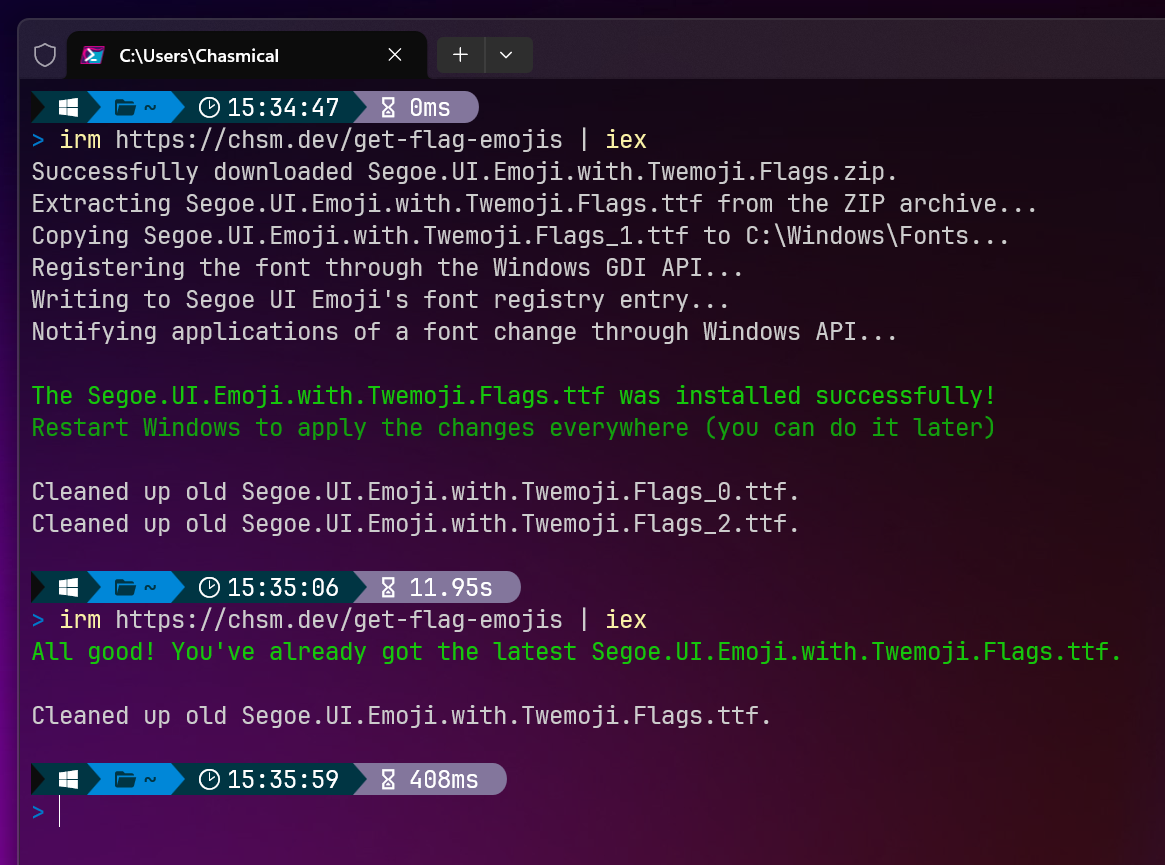
You can find the entire script here. Here's a summary of the steps it performs:
- Re-runs the script as admin if necessary,
- Calculates the SHA256 of the currently installed Segoe UI Emoji file, and compares it with the hash of the latest Segoe.UI.Emoji.with.Twemoji.Flags.ttf. Stops if it's up to date.
- Downloads the ZIP archive with the font (50% smaller than just the .ttf),
- Copies the font to the C:\System\Fonts directory,
- Adds the font as a resource using Windows' GDI API,
- Sets Segoe UI Emoji's font registry entry to the new filename,
- Notifies applications of a font change through Windows API,
- Cleans up old font files.
To avoid having to update the script file for every release, the file is pre-processed by this site, replacing a placeholder "<THE-LATEST-HASH-WILL-BE-INSERTED-HERE-BY-THE-HOST-WEBSITE>" with the actual latest hash.
Conclusion
The font has been improved a lot since the last post. The flags' widths are now consistent with other emojis, and there are now new 17.0 emojis. The font now supports not only Windows 11, but also Windows 8 through 10, and includes black-and-white fallback for apps without colors. A few weird third-party compatibility issues were also fixed (xterm.js, partially: #13, Qt: #16).
There's only one big issue left: Modifying the Emoji Picker (Win+.) to include flag emojis (#5). This is a really important one, would make inserting country flags a thousand times easier! Unfortunately, I don't have much reverse-engineering experience, so I'd appreciate any help!
Also, subscribe to my blog's RSS feed to stay tuned!